
Invoice Maker - InvoiceBase
Gulooloo Tech Co., Ltd.Business
4.9669.00 Reviews
- Version
- 1.02.70.0811
- Installs
- 1.00M
- Age Rating
- Everyone
Screenshots

Our Review of Invoice Maker - InvoiceBase
 Analysis by Appyee
Writing invoices from scratch is one of those small jobs that can quietly eat into a workday. You have to remember what was delivered, enter the client’s details, check the amounts, and then keep track of whether payment arrived. Invoice Maker - InvoiceBase is aimed at making that routine less fiddly by putting invoice creation and follow-up in one place. I see the appeal most clearly for people who handle straightforward billing themselves and want less admin between finishing a job and asking to be paid.
Who benefits most from a quicker invoice routine
For a freelancer, a repair professional, or a small service business, the useful part is not simply producing a document; it is being able to do it while the work is still fresh in mind. If I have just finished a home visit, for example, I can prepare the bill before moving on to the next appointment rather than relying on a note that might get lost. That kind of immediate capture can reduce forgotten line items and the end-of-week scramble to reconstruct what happened.
It is less compelling for someone who sends only a few invoices a year and already has a reliable document template. In that case, another app may feel like an extra step rather than a time-saver. The benefit grows when billing is a recurring task and the same person is responsible for creating documents, checking their status, and following up.
A practical way to approach the first invoice
I would start by preparing one ordinary invoice rather than trying to configure every possible detail at once. Add the business and client information carefully, then use a familiar job as a test: list the actual work, check each amount, and review the finished document before sending it. This small dry run is useful because a polished layout can make an invoice look complete even when a name, quantity, or charge still needs attention.
Customization is best treated as a one-time setup task, not a reason to redesign every bill. A logo and a consistent template can help clients recognize your paperwork, but changing colors or layouts for each job adds effort without necessarily improving clarity. I would settle on a restrained style, then spend the saved time checking the details that affect payment: the correct recipient, a readable breakdown, and the amount due.
Where it fits in a working day
Picture a self-employed cleaner finishing a job at a client’s home. Before leaving, they can note the service and price, prepare the invoice, and keep its status with the rest of their billing. Later, they can see whether it remains unpaid and send a reminder instead of searching through messages to remember who still owes money. That is a modest workflow, but it addresses a real source of friction for a one-person business.
The same approach can help a consultant who bills after each session or a tradesperson who needs to separate labor from materials. My practical tip is to record the work in clear, client-friendly terms rather than using shorthand that only makes sense internally. A brief description can make a bill easier to understand and reduce avoidable back-and-forth, even when the app handles the layout for you.
How it compares with familiar alternatives
A spreadsheet offers flexibility and can be a sensible choice when you already maintain your own records, but it asks you to manage the structure and status tracking yourself. A word-processing template is similarly familiar, though repeated editing can lead to inconsistent details or old information surviving in a new document. InvoiceBase is more appealing when you want invoice creation and an at-a-glance view of paid and pending bills to live together.
On the other hand, businesses with complex accounting, inventory, tax workflows, or several staff members may be better served by a broader bookkeeping platform. A focused invoice tool can simplify issuing bills without replacing the need for a complete financial system. I would choose based on the whole workflow: if billing is the main bottleneck, a dedicated app makes sense; if invoices are only one part of a tightly connected operation, the convenience of an all-in-one service may outweigh a simpler interface.
One trade-off worth considering is that a phone-first workflow makes quick billing convenient, but careful review still matters. Before sending anything, I would check that the client’s details and line items are accurate and keep a separate record of any business information that must be preserved. An app can organize the routine; it cannot decide whether a charge is correct or substitute for the record-keeping your business requires.
If you are wondering whether it costs anything to begin, InvoiceBase is free to download, with in-app purchases available. That makes it possible to try the basic workflow before deciding whether paid options are useful to you. I would first identify what you actually need—such as a consistent template or an easier way to monitor unpaid bills—rather than paying for extras simply because they are offered.
Privacy and reliability are sensible questions whenever client and payment information are involved. I would use a device lock, avoid sharing access casually, and keep whatever independent business records your working practices require. The published app description is not a substitute for reviewing the app’s current privacy details or testing how it behaves on your own device, so those checks are worth doing before making it the sole home for important records.
InvoiceBase is an Android business app from Gulooloo Tech Co., Ltd. It is rated for Everyone, and its Android release requires version 5.0 or later; the current version is 1.02.55.0207. Its 4.9 average from around 46,000 ratings and more than a million installs suggest that many people have tried it, though popularity alone cannot tell you whether its workflow fits your business.
What to expect from reminders and everyday use
Reminders are useful when they support a deliberate follow-up routine, not when they replace one. I would check the invoice status before contacting a client, then keep the message polite and specific so the recipient can identify the bill. If you prefer to review every reminder yourself, that habit also gives you a chance to catch a payment that arrived through another channel before sending an unnecessary nudge.
For someone who works offline at job sites or needs to issue documents under local tax rules, the sensible approach is to test the exact process before depending on it. Create a sample, inspect the output, and confirm that it suits the way you bill. That is especially important if your invoices need special fields or a particular legal format; convenience is valuable only when the finished document meets your real requirements.
Getting Started with InvoiceBase
First things first, downloading Invoice Maker - InvoiceBase is a breeze. A quick search on the App Store or Google Play, and you’re good to go. Once installed, the app greets you with a clean interface that’s surprisingly intuitive. No need to be a tech wizard to figure it out. I was up and running in minutes!
Features That Stand Out
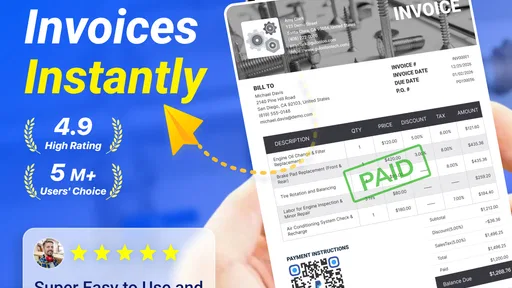
Now, let’s dive into what makes this app tick. The first thing that caught my attention was the ease of creating invoices. You can whip up a professional-looking invoice in less time than it takes to brew a cup of coffee. Just fill in your details, add items and prices, and voila! You’ve got yourself an invoice.
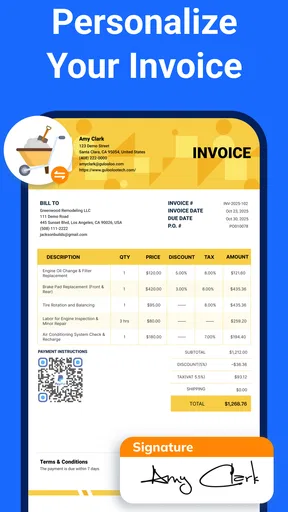
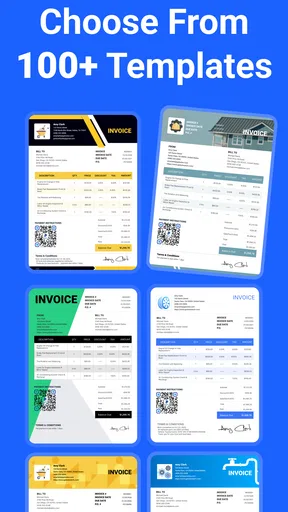
But wait, there’s more! The app also allows you to customize your invoices. You can add your logo, choose different templates, and even change the color scheme to match your brand. It’s those little touches that make a huge difference.
Keeping Things Organized
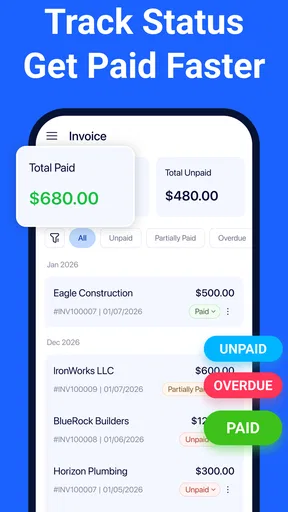
One of my favorite features is the ability to keep track of all your invoices in one place. The app organizes everything neatly, so you can easily see which invoices are paid and which ones are still pending. No more digging through piles of paper or endless email threads. It’s all right there at your fingertips.
The app also sends reminders for unpaid invoices, which is a lifesaver. Let’s face it, we all have that one client who needs a gentle nudge every now and then. With InvoiceBase, you can send polite reminders without lifting a finger.
Security and Integration
Security is always a big concern, especially when dealing with financial information. I was pleased to find that InvoiceBase takes this seriously. The app uses encryption to keep your data safe, which gives me peace of mind.
Plus, if you’re like me and use multiple tools for your business, you’ll be happy to know that InvoiceBase integrates seamlessly with other apps like accounting software and payment gateways. It’s all about making life easier, and this app does just that.
Why You’ll Love It
So, why should you give InvoiceBase a shot? Well, if you’re tired of the old-fashioned way of handling invoices, this app is a game changer. It’s fast, efficient, and user-friendly. Whether you're a freelancer, small business owner, or just someone who needs to manage invoices, this app is worth checking out.
In a world where time is money, having a tool like InvoiceBase can really help you streamline your finances and focus on what you do best. So go ahead, give it a whirl and see how it can make your life a little bit easier.
Ready to take the plunge? You can download Invoice Maker - InvoiceBase on both Android and iOS. Trust me, you won’t regret it.
Verdict
Strengths of Invoice Maker - InvoiceBase
- User-friendly interface for quick navigation.
- Customizable templates for branding needs.
- Supports multiple currencies for global business.
- Integrated payment gateway for faster transactions.
- Automatic tax calculations simplify invoicing.
Limitations of Invoice Maker - InvoiceBase
- Limited free version features.
- Occasional syncing issues with other devices.
- No offline mode available for remote areas.
- Customer support response can be slow.
- Advanced features require a subscription.
Other Releases by Gulooloo Tech Co., Ltd.
View All
QR Code Generator - QRHyper
Productivity4.8
Similar Picks in This Category
View All
LinkedIn: Community & Network
LinkedIn3.8

Zoom Workplace
zoom.com4.1

Microsoft Teams
Microsoft Corporation4.6

Meta Business Suite
Meta Platforms, Inc.4.6

Webex Meetings
Cisco Systems, Inc.4.5

TeamViewer Remote Control
TeamViewer4.4
Frequently Asked Questions
What features does Invoice Maker - InvoiceBase offer?
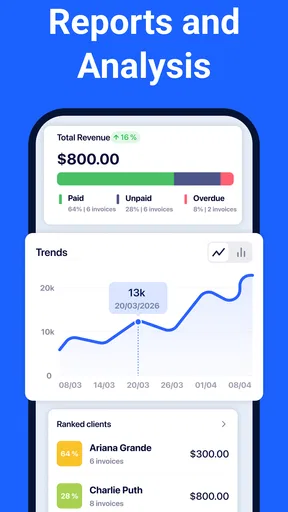
Invoice Maker - InvoiceBase offers a comprehensive set of features including customizable invoice templates, automatic tax calculations, and multi-currency support. Users can also track expenses, send payment reminders, and generate detailed financial reports, making it a versatile tool for freelancers and small business owners.
Is Invoice Maker - InvoiceBase user-friendly for beginners?
Yes, Invoice Maker - InvoiceBase is designed with an intuitive interface that is suitable for beginners. The app provides easy-to-follow tutorials and tips to help new users navigate through the various features, ensuring a smooth and efficient invoicing experience right from the start.
Can I use Invoice Maker - InvoiceBase offline?
Invoice Maker - InvoiceBase requires an internet connection for most of its functionalities, including syncing data and sending invoices. However, you can create and edit invoices offline, and they will automatically update once you reconnect to the internet, ensuring uninterrupted productivity.
Is my data secure with Invoice Maker - InvoiceBase?
Invoice Maker - InvoiceBase prioritizes user data security. It employs advanced encryption methods and complies with industry standards such as GDPR to protect user information. Regular backups and security updates ensure that your data remains safe and secure at all times.
Does Invoice Maker - InvoiceBase integrate with other financial tools?
Yes, Invoice Maker - InvoiceBase offers seamless integration with various financial tools and platforms such as QuickBooks, PayPal, and Stripe. This allows users to streamline their accounting processes, accept online payments, and manage their finances more efficiently.
